top of page
Effortless management, timely reminders, simple life.
Stay Organized, Stay On Time, and Achieve More Every Day
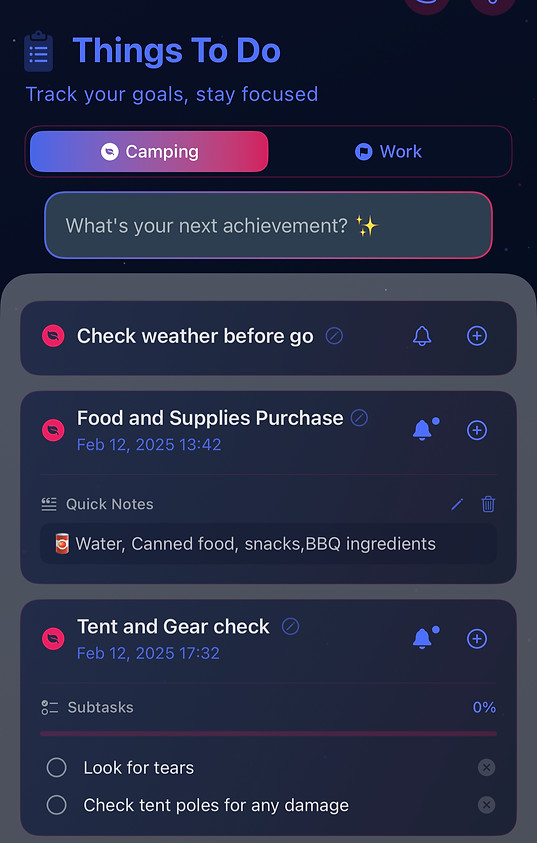
Stay Motivated
Guide
🚀 Quick Start Guide
-
📝 Create Your First List
-
Tap the + on the Home Screen
-
Name it (e.g., "Camping Prep") 🌲
-
Choose an icon & color 🎨
-
Enable notifications 🔔
-
-
➕ Add Tasks
-
In your list, tap + Task
-
Type or speak: "Buy tent next Saturday at 10 AM" ⛺
-
The app auto-detects date/time 📅 and confirms: "Set for Apr 20, 10:00?"
-
-
🔨 Break Down Complex Tasks
-
Long-press a task → Add Subtask
-
Example for "Plan Camping Trip" 🏕️:
-
Pack sleeping bags (Fri 6 PM) 🛏️
-
Check weather (Sat 8 AM) 🌤️
-
-
-
⏰ Customize Reminders
-
Open any task → Reminder Settings ⚙️
-
Add 2 alerts: 1 day before & 1 hour before ⏳
-
Set repeat: "Every 2 weeks" for recurring tasks 🔄
-
-
-
📋 Batch Manage Tasks
-
Press & drag to select multiple items → Choose:
-
Reschedule All (move to next weekend) 📅
-
Move to... (transfer to "School" list) 🎓
-
Delete Completed 🗑️
-
-
-
🎨 Personalize Your Style
-
Go to Settings → Themes 🌈
-
Select "Forest Green" for your camping list 🍃
-
Enable auto-dark mode after sunset 🌙
-
-
💡 Pro Tips
-
🔹 Say "Remind me to..." when voice-adding tasks 🎤
-
🔹 Pin important lists to the top for quick access 📍
bottom of page